| public | ||
| src | ||
| .gitignore | ||
| azure-pipelines.yml | ||
| babel.config.js | ||
| jest.config.js | ||
| package-lock.json | ||
| package.json | ||
| README.md | ||
| vue.config.js | ||
| vue.release.config.js | ||

Fix My Glass Vue Project
This Repository is for Fix My Glass front end Vue and documentation associated with it.
Routing
We are using Vue Router 4.x for our front end routing. We are using a runtime dynamic routing solution. Some more information about dynamic routing can be found on the official Vue Router documentation.
Here is a high level overview of how our routing works:
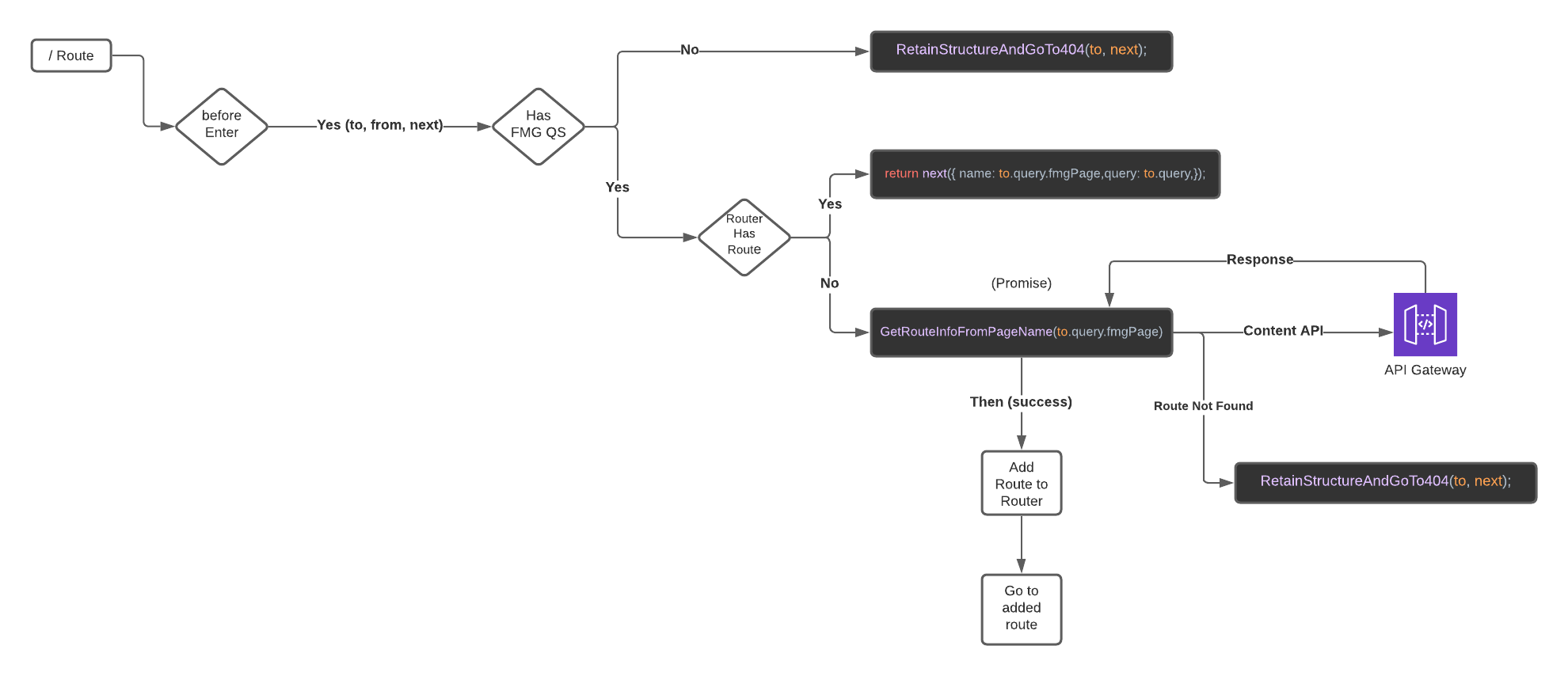
RetainStructureAndGoTo404(to, next) - Since our 404 path on our router is path: '/:pathMatch(.*)*' (meaning that we don't have a dedicated 404 route) we retain the information entered by the user in the url bar and just serve back our NotFound component on Vue. For example if a user was to type in .../fmg/fmgPage=junkPage Vue will retain this url in the browser and return our NotFound component. This could be especially useful for analytics and reporting.
Next() - Is a function that is native to Vue Router in which we call in order to send the user where want them to go based on some logic we have. You can read more about Navigation Guards and the Next() function on the Vue Router documentation.
GetRouteInfoFromPageName(PageName) - This method typically takes the query string value of fmgPage and passes it into a call to our Content Service. The service will pull information on the page; matching page name passed to page name in our Cms. If we have a match, we will compile the route information and send it to our router to process. If we do not have a that page in our Cms, the user will be served back a 404 page while retaining the structure.